
The First 5-Minutes
A few weeks ago, I saw a team use AI for a reconciliation.
But the problem was that they ran it in one direction only. It flagged what was missing from one list, but never checked the other. A beginner mistake, because of poor prompting and over trusting the output.
Every month I run the same crash course in my AI Finance Club.
The same thing happens in the first five minutes – Before I teach anything, I give one exercise. "You want to automate your monthly reporting. Write the prompt you'd send your AI tool." Then I wait.
Most people write two lines. They're being a bit lazy in the prompt. If they were outside of my community, it would lead to an output that is not good, and they would stop trying.
The mistake is treating AI like an Excel formula. Typing it, and thinking it should just work.
To get past this, I’ll show you the 3 habits that separate the 1% of finance pros getting real value from AI, from the 99% starting from scratch, getting bad outputs, and giving up.
Based on training over 70k finance pros in my masterclasses, and the 3,355 in my community.
The 3 habits of the top 1% finance team
Most people expect AI to work like Excel because it can look intelligent. So they assume it can read their mind. It can't.
It’s super important to know that the best finance pros aren't smarter, and they don't have better tools. They do three things the 99% don't do consistently. They structure every prompt. They audit every output. And they build a workflow once so they never rebuild it.
None of these are advanced techniques. They're habits:
1. Brief AI like a new team member
|
|
In our crash courses I teach CSI + FBI.
- Context (who you are, what tools you use),
- Specific (the exact problem),
- Instruction (what to do).
Then
- Format (table, chart, commentary),
- Blueprint (column names, constraints, an example),
- Identity (like "act as a CFO presenting to the board")
In short – the more context you give, the better the output. That one prompt might take three minutes to write, and it’ll save you 45 minutes of fixing what comes back.
2 extra tips for you:
- Ask AI to ask you questions before it answers. Or paste your rough prompt and tell it to improve the prompt.
- It's not just the prompt. Pick the model. The default "instant" model is like using ChatGPT from three years ago. Switch to a thinking model for anything complex and the quality improves a lot.
The next step is to match the prompt to the tool:
- Chat tools (ChatGPT, Gemini, Claude chat) are conversational. Start, look at the output, then push back: "rewrite with 3 bullets and add a chart." Back and forth until it's right.
- Agentic tools (Claude Cowork, Excel's Edit with Copilot, a Copilot agent) are the opposite. If your folders and project are set up right, describe the outcome, not the steps: "Build a transformation roadmap from this data, ready for the board." The agent already has the context. One tip: Copilot rejects prompts labelled "system prompt", so call it a "master prompt".
Plus something else to look out for, OpenAI have just released ‘ChatGPT Work’ which is similar to Claude Cowork.
2. Make AI show its working, and check the thinking behind it.
|
|
Generative AI is not deterministic, it’s probabilistic.
- Deterministic = The same input will always produce the exact same output
- Probabilistic = Relies on statistical likelihoods (introduces uncertainty) meaning the exact same input can produce different results.
It generates answers, but it doesn't compute them the way Excel does. So the top finance pros never trust a number they can’t audit.
So make AI show its working. Ask it to reproduce the analysis in Excel with live formulas, not hard-coded values. Or, when it's run Python in the background, ask it to document the logic in plain English so a non-coder can check the maths.
If you want to know where someone on your team sits, look at how they talk to AI. Do they ask one question and take the answer straight away, or do they have a real discussion including checks? Do they come back next month with the same weak prompt that failed last time? That tells you they're not learning.
The test is to ask someone what the logic was and why did you do it this way? If the only answer is "I asked AI", this is a red flag.
Reviewing AI output is just like tasting the meal before it leaves the kitchen – I love seafood, but I don’t enjoy eating it raw or overcooked.
3. Build the workflow once, then stop rebuilding it.
 |
If you're typing the same instructions every week, you're working harder than you need to.
The top finance pros invest a lot of effort once.
- Get a rough draft to 80%.
- Then spend the extra 30 to 60 minutes pushing it to the 95% good enough to sign off.
- Then ask AI to write the exact instructions that got you there.
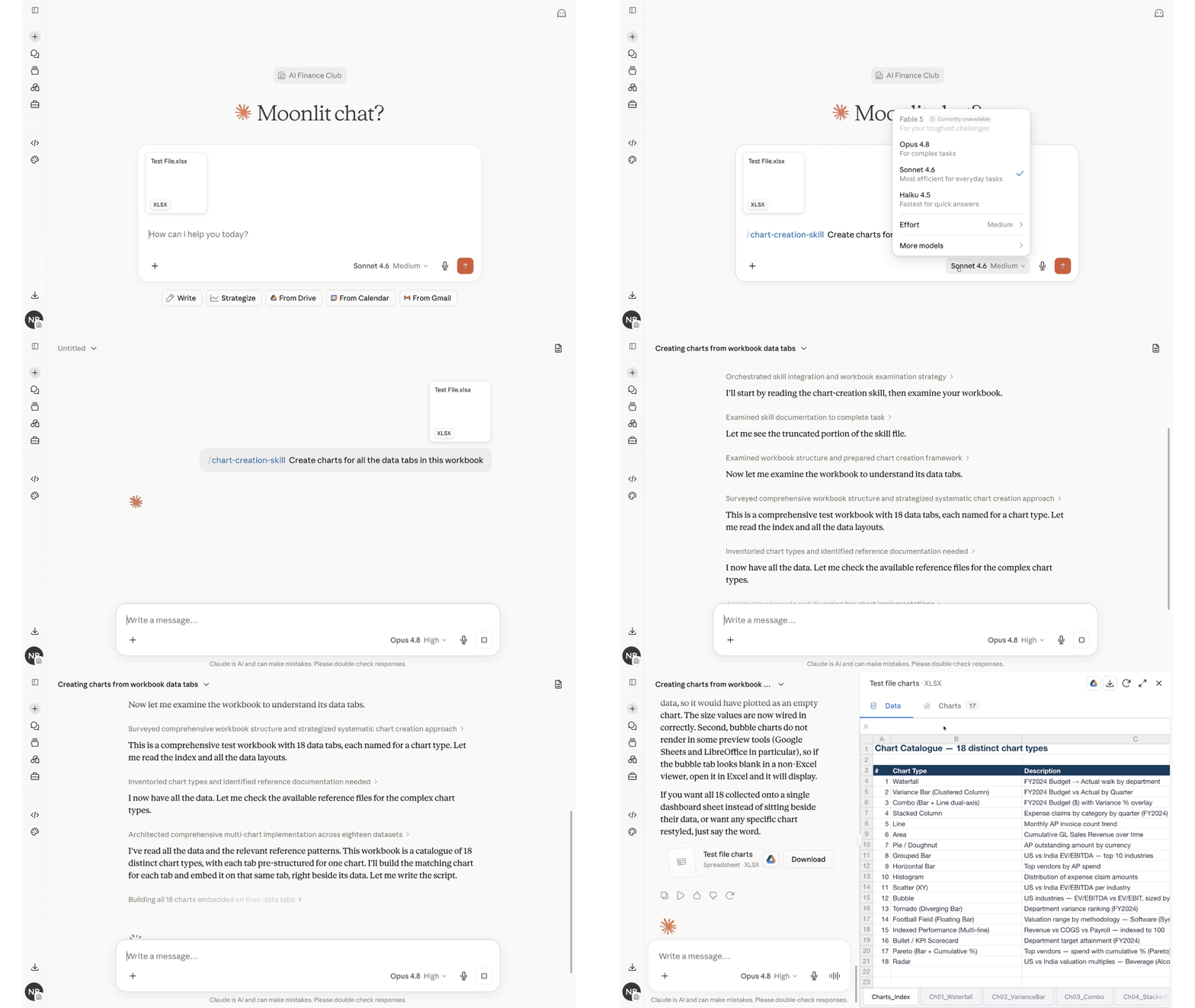
Then, drop those instructions into a custom GPT, a Gemini Gem, a Copilot agent, or a Claude Project. Next month you don't prompt and fine-tune for an hour.
It's like your times tables. Yes, it takes effort to learn once that seven times seven is 49. But then you're miles faster than the person reaching for the calculator every single time.
Anna Tiomina, one of our Fractional CFO experts, moved her weekly cash forecast into Claude Projects and Cowork. Effort up front, and now it runs in the background while she spends the time on advice, not admin.
And when our experts built 10 agent templates for the club, members copy-pasted them over 700 times.
This is the power of good prompting, and smart workflows.
The One Thing to Remember
The top 1% of finance pros focus on good AI habits.
A two-line prompt is an indication that someone is not putting their own thinking in first. And if they don't think, they don't add value.
You don’t want your team sending you AI generated summaries. Or AI generated spreadsheets that you have to unpick.
But what’s good is you don't need a bigger budget or a new platform. You just need your team to structure the prompt, audit the output, and build a repeatable workflow once.
Best,
Your AI Finance Expert,
– Nicolas
P.S. – The best way to learn from me directly is to join my weekly masterclasses. 60-mins + Q&A where I’ll get all your AI in Finance questions answered. Join me here.
P.P.S – Want everything about Claude for Finance in one watch? Here it is → Everything About Claude for Finance in 7 Minutes 34 Seconds